Discussion: https://social.futuretim.io/@futuretim/110555219379335576
Continuing from part 1 we now need to complete the setup of our repository, add it to a host where we want to use it, add an application to the repository and then install and run it.
In this series we are managing applications and repositories at the system level. This can all be done withour elevated privileges using the --user flag. You can read more about that here.
If you’ll remember from part 1 we created a stable repository for our applications located at flat-manager/stable-repo relative to our compose data location.
We now need to sign this repository with the key we created so that it can be trusted by the hosts we use it on. To do this use the following:
flatpak build-sign flat-manager/stable-repo --gpg-sign=67530A28FF5D5226A43D3C9DC86EFAA0A61EC50A --gpg-homedir=./gpg
We need to do the same with the summary file like so:
flatpak build-update-repo flat-manager/stable-repo --gpg-sign=67530A28FF5D5226A43D3C9DC86EFAA0A61EC50A --gpg-homedir=./gpg
Once we’ve done those steps we are ready to add it to a host so that we can use applications from it.
You can do this on the host using the following:
sudo flatpak remote-add personal-stable http://example.com:10000/repo/stable
You should receive a warning.
Warning: Could not update extra metadata for 'personal-stable': GPG verification enabled, but no summary found (check that the configured URL in remote config is correct)
In this case by default it will be unusable so let’s fix that. First remove it:
flatpak remote-delete personal-stable
First we need to add something to our repository so that a summary is created and we have something to install.
For this purpose let’s use something very simple. I chose to use the Color Picker app. If this is suitable for you then it’s flatpak/flathub repo is here.
Build it using:
flatpak-builder build --force-clean --repo=local-repo nl.hjdskes.gcolor3.json
Now we’re ready to add that to our repository using flat-manager. Let’s do that like so:
./flat-manager-client push http://example.com:10000/api/v1/build/1 ../nl.hjdskes.gcolor3/local-repo/
Now we’ll commit it and publish it:
./flat-manager-client commit http://example.com:10000/api/v1/build/1
./flat-manager-client publish http://example.com:10000/api/v1/build/1
If that was successful then we are ready to install our application on the host we added the respository to. Checking the database builds table is an easy way to see if everything worked out, if not you will find error messages in either the repo_state_reason or published_state_reason columns.
Now we can add our repository to the host where we want to install an application:
sudo flatpak remote-add personal-stable http://example.com:10000/repo/stable --gpg-import=./personal-stable.key
Here personal-stable.key is the public key of the key pair that we created for our repo. It can be obtained using the following command on the host that has our repository container setup.
gpg --homedir ./gpg --export Flatpak > personal-stable.key
Finally, let’s install our application:
flatpak install personal-stable gcolor3
We should see a prompt similar to this:
Looking for matches…
Similar refs found for ‘nl.hjdskes.gcolor3’ in remote ‘personal-stable’ (user):

   1) app/nl.hjdskes.gcolor3/x86_64/master

Which do you want to use (0 to abort)? [0-1]:
And once we answer yes:
nl.hjdskes.gcolor3 permissions:
    ipc fallback-x11 wayland x11


        ID                                   Branch           Op           Remote                    Download
 1. [✓] nl.hjdskes.gcolor3.Locale            master           i            personal-stable             3.2 kB / 74.6 kB
 2. [✓] nl.hjdskes.gcolor3                   master           i            personal-stable           142.2 kB / 148.9 kB

Installation complete.
Now run it!
flatpak run nl.hjdskes.gcolor3
Tada
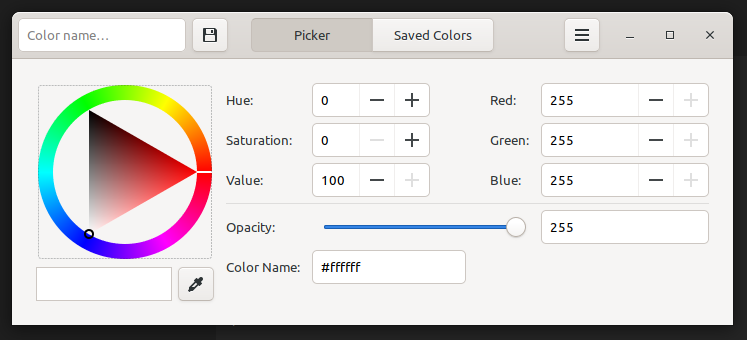
And let’s look at some information for this application using flatpak info nl.hjdskes.gcolor3.
Color Picker - Choose colors from the picker or the screen
          ID: nl.hjdskes.gcolor3
         Ref: app/nl.hjdskes.gcolor3/x86_64/master
        Arch: x86_64
      Branch: master
     Version: 2.4.0
     License: GPL-2.0+
      Origin: personal-stable
  Collection:
Installation: system
   Installed: 402.4 kB
     Runtime: org.gnome.Platform/x86_64/43
         Sdk: org.gnome.Sdk/x86_64/43
      Commit: e79317368f85812b9364f1b63160adbcca5b3150bf7f923bb6ab9b145a85615b
     Subject: Export nl.hjdskes.gcolor3
        Date: 2023-04-14 17:12:45 +0000
Shout-outs and References:
Clearly this guide pulls on information for a lot of pre-existing sources created by wonderful people. The main resources are listed below.