By the end of the post, my hope is that we have a working environment for experimenting with Rust and Pytorch/ML. One of our end goals (not this post) is to be able to run Stable Diffusion and train/refine models. To do this I’m going to be using tch-rs. I’m not going to go over basic Rust environment setup and assume that you can compile and run (debugging at your option) a basic Rust Hellow World application.
I guess a first point of potential confusion is that we are going to be using a precompiled, binary distribution of PyTorch called LibTorch. So we need to go download that.
You can get that here. A silly thing that tripped me up for a bit is that there is a “selector” on that page that is unlike one I’ve ever seen before and I didn’t recognize it as such at first.
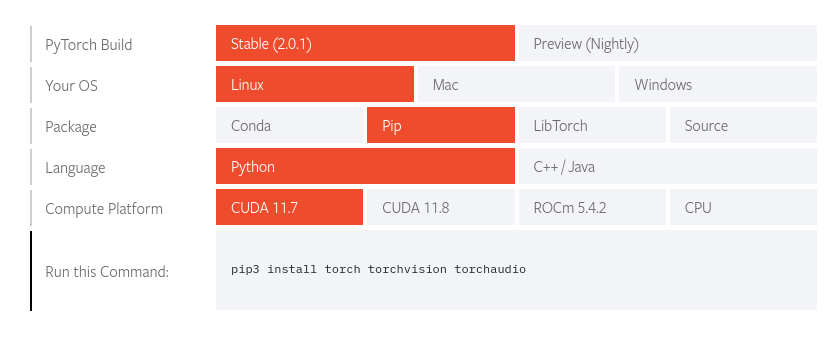

Notice between the two pictures that the orange represents “selection” and you can click on the different boxes to change your selection. In this case we want the latter but choose the appropriate option depending on what you’ll run on. Then grab the cxx11 ABI version and extract it. I extracted it to my home directory for now so I have $HOME/libtorch. You can put it whereever you want you’ll just need to use that value later when we setup our environment variables.
Let’s create a new project using cargo new tch. Once that’s done let’s switch to that directory. Open Cargo.toml and add the tch dependency.
[dependencies]
tch = "0.13.0"
Without doing anything else let’s run cargo build and see where we’re at. You will most likely get some variation of this:
error: failed to run custom build command for `torch-sys v0.13.0`
Assuming all the other dependencies are met (able to build C++, other libraries, etc.) then torch-sys just needs to know where to find libtorch. Let’s try this:
export LIBTORCH=/home/tim/libtorch/lib; export LIBTORCH_BYPASS_VERSION_CHECK=1;LIBTORCH_INCLUDE=/home/tim/libtorch
cargo build
Then our build should work and we should be able to run our Hello, world! application just fine. However, that doesn’t really test LibTorch as such. So what’s the minimal we could do to test that? The PyTorch Hello, World! equivalent; generate a tensor with random numbers from the uniform distribution on the interval [0,1). We’ll create a tensor with dimensions 2x3.
Open src/main.rs and put the following code:
use tch::{Tensor, Device};

fn main() {
    println!("Hello, world!");

    let device = Device::cuda_if_available();

    let val = Tensor::rand([2, 3], (tch::Kind::Float, device));

    println!("Device info:");
    println!("{:?}", device);

    println!("Values:");
    val.print();
}
Now, let’s run cargo build again. This time we have trouble. We didn’t export our lib path so let’s redo our exports:
export LIBTORCH=/home/tim/libtorch; export LIBTORCH_LIB=/home/tim/libtorch/lib; export LIBTORCH_BYPASS_VERSION_CHECK=1; export LIBTORCH_INCLUDE=/home/tim/libtorch
I am also exporting LIBTORCH_BYPASS_VERSION_CHECK=1 because I’m using 2.0.1 and tch expects 2.0. I figured it would be OK because it’s a minor bump but I could always go back to 2.0 if I needed to or recompile tch.
Now our cargo build should work and we can run it.
./target/debug/tch-test
If everything worked then we should see a similar output to the following:
Hello, world!
Device info:
Cpu
Values:
 0.8966  0.9421  0.8239
 0.1948  0.2102  0.4322
[ CPUFloatType{2,3} ]